

Hispanic players who adore the thrill of a authentic casino can now tuck that experience into their pocket with the Bwin Casino app. The mobile application offers a full spread of live dealer games straight to smartphones and tablets, blending the ease of portable play with the atmosphere of expertly hosted tables. This is not a simplified version of the desktop site. The app was specially designed to offer seamless streaming, nimble touch controls, and instant access to a lobby filled with blackjack, roulette, baccarat, and game‑show titles. Hispanic users get a fully localised interface, customer support in Spanish, and payment methods that are standard across the country. This article leads through how to get the app, which devices it accommodates, what live dealer features are provided, and how the mobile experience measures against playing on a computer. Every detail is here to assist a novice or seasoned player know exactly what to expect before they place their first bet.
The way to Get and Set Up the Bwin Casino App in Spain
Getting the Bwin Casino app onto a phone in Spain is easy, but the process change depending on whether the player uses an Android or iOS device. For iPhone and iPad owners, the software sits in the Apple App Store. A query for “Bwin Casino” displays the official app, set to download and install with a single tap. Apple’s approval process verifies that the app is safe and complies with all platform guidelines, so Spanish players can install it without worry. Once the download finishes, signing in with registered account details or creating a new account takes only a few moments. The iOS app is designed for the most recent iOS versions, and the download size is reasonable enough not to eat through mobile data caps.
Android owners follow a a bit alternative path because many gambling apps are not delivered through the Google Play Store in Spain. Instead, Bwin supplies the installation file, known as an APK, straight from its mobile site. To begin, a player accesses the authentic Bwin Casino site using the internet browser on their Android phone. A clearly marked “Mobile App” or “Download” part presents the option to grab the APK file. Before the file can be set up, the phone’s safety settings must be modified to permit installations from unknown sources. This is a standard step for apps obtained outside the Play Store and can be reverted instantly after completion. Once the APK downloads, clicking it opens the installer, and the app is prepared to use within a short time. Spanish users who are unfamiliar to sideloading should observe the on‑screen prompts closely; the process is secure when the file comes from the authentic Bwin domain.
The Range of Live Dealer Games Accessible on the App
Spanish players employing the Bwin Casino app get access to a rich catalogue of live dealer games delivered by leading studios such as Evolution and Pragmatic Play. The lineup covers all the classics: multiple blackjack tables with varying bet limits and side‑bet options, European and French roulette, speed roulette for quicker rounds, and traditional baccarat alongside its squeeze and speed variants. Beyond the staples, the app features a number of game‑show experiences that blend elements of board games and television entertainment. Titles like Dream Catcher, Crazy Time, and Monopoly Live boast charismatic hosts, bonus rounds, and multiplier mechanics that can considerably increase payouts.
Poker enthusiasts are not left out; the app includes live Casino Hold’em, Three Card Poker, and Caribbean Stud Poker tables. Each game type is available around the clock, with dealers operating from professional studios in multiple time zones. This means a player in Madrid can access a table at any hour and find an active game with a live host. The app also supports niche variants such as Lightning Roulette, where randomly selected numbers receive boosted multipliers, and Infinite Blackjack, which accommodates an unlimited number of players at the same table. Spanish players who enjoy a more private setting can look for VIP tables with higher limits and a more exclusive atmosphere, all clearly labelled in the lobby.
Browsing the Live Dealer Lobby on Mobile
When the app is installed and the player has entered their account, the live dealer lobby sits in the main navigation menu. The lobby has been reworked for compact screens, with large, tappable thumbnails that present a preview of each table together with key information such as the dealer’s name, minimum and maximum bet limits, and the number of open seats. Spanish players can narrow the game selection by type—roulette, blackjack, baccarat, poker, or game shows—using a horizontal scroll bar at the top of the screen. This filtering system is responsive and removes the need to scroll through dozens of tables to find a favourite variant. A search function is also present for those who are aware of exactly which table they want to join.
The lobby updates in live, so a table that is full one moment may release a seat the next. Players can join a table with a single tap, which opens the streaming interface. For popular tables during peak evening hours in Spain, it is sensible to check back regularly or use the “Join Waitlist” feature where offered. The mobile lobby also presents tables that are about to start a new round, which is notably useful for game‑show titles such as Crazy Time or Monopoly Live that operate on a planned spin basis. Navigation between the lobby and an active game feels smooth; a swipe or a back button returns the player to the full list without closing the stream harshly, preserving the session state.
Streaming Performance, Speed, and Data Usage
Live dealer games on the Bwin Casino app broadcast in high definition, with adaptive bitrate technology that modifies video quality based on the player’s internet connection. On a reliable 4G or Wi‑Fi network, the stream typically runs at 720p or 1080p, providing sharp visuals of the dealer, the table, and the cards or wheel. The app’s video player is lightweight and designed to reduce buffering, even when switching between landscape and portrait orientation. Spanish players who are concerned about mobile data consumption can rest easy; the app offers an option to lower the video quality manually, which can cut usage to roughly 250–400 MB per hour instead of the 700 MB or more that HD streaming can consume.
The audio stream counts just as much for immersion, and the app handles it well. Players hear the dealer’s voice distinctly, along with ambient casino sounds that can be muted separately from the game sounds. Latency is kept to a minimum; the delay between the dealer’s action and its appearance on the screen is typically under two seconds on a good connection. The app also features a network strength indicator, so a player can see at a glance whether their connection is strong enough for uninterrupted play. For the best experience, Spanish users are advised to connect to a private Wi‑Fi network when playing for extended periods, although the app performs reliably on 4G and 5G mobile networks across Spain’s major providers.
Protected Banking and Portable Payments for Spain-based Players
Handling funds on the Bwin Casino app is designed to be as safe and convenient as the gaming itself. Spanish players can add funds and withdraw using a selection of methods that are highly regarded in the country, including Visa and Mastercard debit cards, PayPal, Skrill, Neteller, and bank transfers. The app links with these services through encrypted connections, and private financial details are never stored on the device. For added convenience, many payment methods support one‑tap deposits after the first transaction, so replenishing a balance during a live session takes only seconds without needing to re‑enter card numbers.
Withdrawal requests are handled through the same cashier section, and the app provides clear status updates for each transaction. While processing times differ by method, e‑wallets typically provide the fastest turnaround, often within 24 hours once the account has been verified. Spanish regulations require identity verification before a first withdrawal, and the app enables users to upload the necessary documents—such as a DNI or passport—directly through a secure document upload feature. This removes the need to switch to a desktop computer. The app also shows a full transaction history, giving players complete visibility over their deposits, wagers, and withdrawals. All financial operations meet Spanish gambling laws and the technical standards set by the Dirección General de Ordenación del Juego.
Accepted Devices and Operating System Requirements
The Bwin Casino app functions across a large range of mobile hardware, but satisfying the required operating system requirements is vital for a smooth live dealer experience. For Apple devices, the app typically needs iOS 14 or later. That means an iPhone 6s or newer, any iPad Air from the second generation onwards, and all iPad Pro models are suitable. Devices running outdated versions of iOS cannot install the app, so players should verify their software version in the Settings menu before starting the download. Keeping the operating system current not only guarantees compatibility but also provides the latest security patches, which matters when managing real‑money transactions.
On the Android side, the app supports devices running Android 7.0 (Nougat) and above. This covers the large majority of smartphones and tablets released in the last several years, including well-known models from Samsung, Xiaomi, Huawei, and Google. While the app runs on devices with as little as 2 GB of RAM, a device with 3 GB or more is advised for the best live streaming performance, especially when multiple camera angles come into play during game‑show titles. Screen resolution is not a constraining factor, but a display of at least 720p keeps the video feed and betting interface crisp. Spanish players using older or entry‑level handsets can still access the app, though they should terminate background applications to free up system resources during a live dealer session.
In-App Features That Elevate the Live Dealer Experience
The Bwin Casino app features several mobile-focused features that make live dealer play more enjoyable than simply viewing a video feed. A notable chat function lets players communicate with the dealer and, in some games, with other attendees at the table. The on‑screen keyboard is tailored for quick messages, and the chat window is placed so it does not block the betting layout. Spanish‑speaking dealers are available at many tables, and the interface itself can be configured to Spanish, so all buttons, game rules, and promotional messages display in the player’s native language.
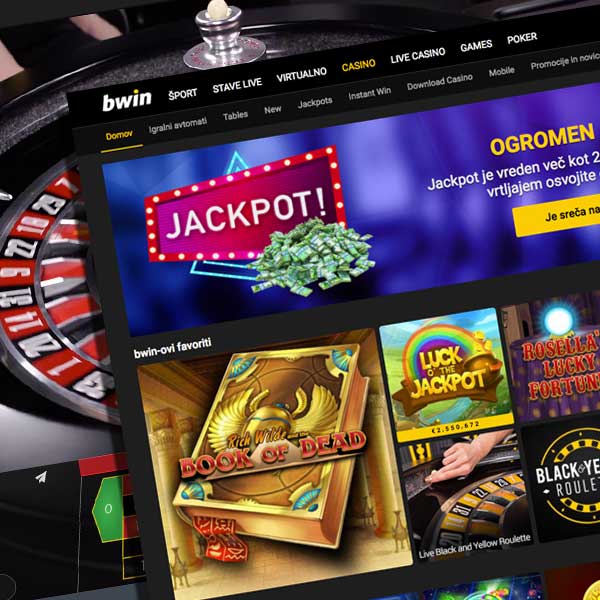
Another standout feature is the bet‑slip history and favourite tables list bwincasinos.eu. The app remembers a player’s most visited tables and allows them to be stored for one‑tap access from the home screen. In‑game statistics are presented for games like roulette and baccarat, showing hot and cold numbers, recent results, and trend indicators that can inform betting decisions. The app also enables multi‑table play on larger screens such as tablets, where a split‑view mode lets a player follow two live streams at the same time. This is especially favoured among Spanish players who like placing bets on different roulette wheels concurrently. Push notifications can be configured to alert users when a seat opens at a full table or when a new game show round is about to start.
Safe Gambling Tools Included in the App
Bwin Casino puts a strong emphasis on player protection, and the mobile app includes a full set of responsible gaming controls that are simple to reach from the account menu. Spanish players can set daily, weekly, or monthly deposit limits that cannot exceeded without a cooling‑off period. The app also enables users to establish session time limits, after which a gentle notification suggests taking a break. For those who need a longer pause, a self‑exclusion option is available that can block access to the account for a period spanning from 24 hours to several months, in line with Spain’s national self‑exclusion registry requirements.
Reality check reminders are another built‑in feature; the app can be set to display a pop‑up at intervals chosen by the player, showing the duration of the current session and the net result so far. This tool is notably useful during immersive live dealer sessions where time can pass unnoticed. The app also supplies direct links to Spanish problem‑gambling support organisations such as FEJAR and Jugar Bien, along with a self‑assessment questionnaire that aids players evaluate their own behaviour. All these tools are displayed in clear Spanish and are accessible without needing to contact customer support, although the support team is prepared to assist with responsible gaming inquiries. The app’s design makes sure that these controls are never hidden away; they sit prominently within the account settings so every player can make informed decisions about their play.
Frequently Asked Questions About Bwin Casino App Live Dealer
Is downloading the Bwin Casino app free in Spain?
Yes, the app is completely free to download for both iOS and Android devices. Bwin does not charge anything to install the software, and players only need to deposit funds if they want to play for real money. There are no concealed charges within the app, and every live dealer game can be browsed and watched in a demo or lobby setting without making a bet. Users in Spain should note that typical mobile data fees from their carrier may apply when streaming live games, yet the app itself adds no extra expenses.
Can I play live dealer games in landscape mode on my phone?
Certainly. Bwin Casino app accommodates both portrait and landscape modes, and the interface automatically tweaks itself to maximize the display space. In landscape orientation, the video feed widens to cover the display’s breadth, and the betting controls shift to the side or bottom, depending on the title. This proves especially useful for roulette and game-show offerings where a wider studio view elevates the gameplay. Spanish tablet users will find landscape mode provides an experience quite similar to playing on a PC.
What are the lowest and highest bet limits on live dealer tables?
Bet limits change across different tables and game types, and the app shows the specific range for each table before a player joins. Usually, there are tables designed for casual players with lower limits and VIP tables for those who prefer higher stakes.
Roulette wheel
Standard European roulette tables commonly accept minimum bets beginning from €0.50 or €1 on straight‑up numbers, with outside marca.com bets at times requiring a slightly higher minimum. High‑roller roulette tables can have minimums of €25 or more, with maximums attaining several thousand euros per spin.
Blackjack game
Live blackjack tables usually start with minimum bets around €5 per hand, though some dedicated low‑stakes tables may go as low as €1. VIP blackjack tables can have minimums of €50 or €100, and the maximum bet per hand is explicitly shown in the table information panel.
Game show titles
Game‑show titles like Crazy Time and Monopoly Live typically have very accessible minimums, often starting at €0.10 or €0.20 per round, making them great for players who want to appreciate the entertainment without committing large amounts. The maximum bets on these games can still hit substantial figures for those who desire to play aggressively.
Is it necessary a separate account to use the app?
How can I reach customer support if I have a problem with the live dealer games?
No existing Bwin Casino account holders can utilize the same login credentials on the app. The account balance, bonus eligibility, and game history are aligned across all platforms, so a player who starts a session on a desktop can pick up seamlessly on mobile. New players can set up an account directly within the app by entering the required personal details and finishing the verification process. Spanish law mandates that all players be no younger than 18 years old and that their identity be confirmed before they may deposit or withdraw funds.
The app includes a live chat feature that links Spanish players with a support agent straight from the game screen or the help menu. Live chat operates 24 hours a day, seven days a week, and agents are trained to assist in Spanish. For less urgent issues, an email contact form is also provided, and the app contains a detailed FAQ section that covers common technical and account‑related questions. Telephone support can be accessed during specified hours, and the number can be found in the app’s contact section.

World Fowl contributor Olivia Bennett is a passionate nature writer who loves exploring the beauty and diversity of birds around the world. She specializes in creating easy-to-read articles about bird species, poultry care, wildlife habits, and backyard birding. With a strong appreciation for nature and detailed research, Olivia helps readers discover fascinating facts, practical tips, and inspiring stories from the world of fowl and wildlife.